
Your job tracker is a very good filing cabinet. That’s the problem.
Most job trackers get one thing right, and it’s worth saying up front because we use them and they’re good at what they do.
Teal, Huntr and Careerflow are genuinely nice tools. You find a job on LinkedIn or wherever, you clip it into the tracker, and now it lives on a tidy board with stages and notes and reminders so you stop losing track of things. That’s a real problem, solved well. Anyone who’s tried to run a job search out of twelve open browser tabs and a Notes app knows exactly which pain they’re fixing.
But notice the first move in all of that.
You find the job.
The filing is solved. The hunting isn’t.
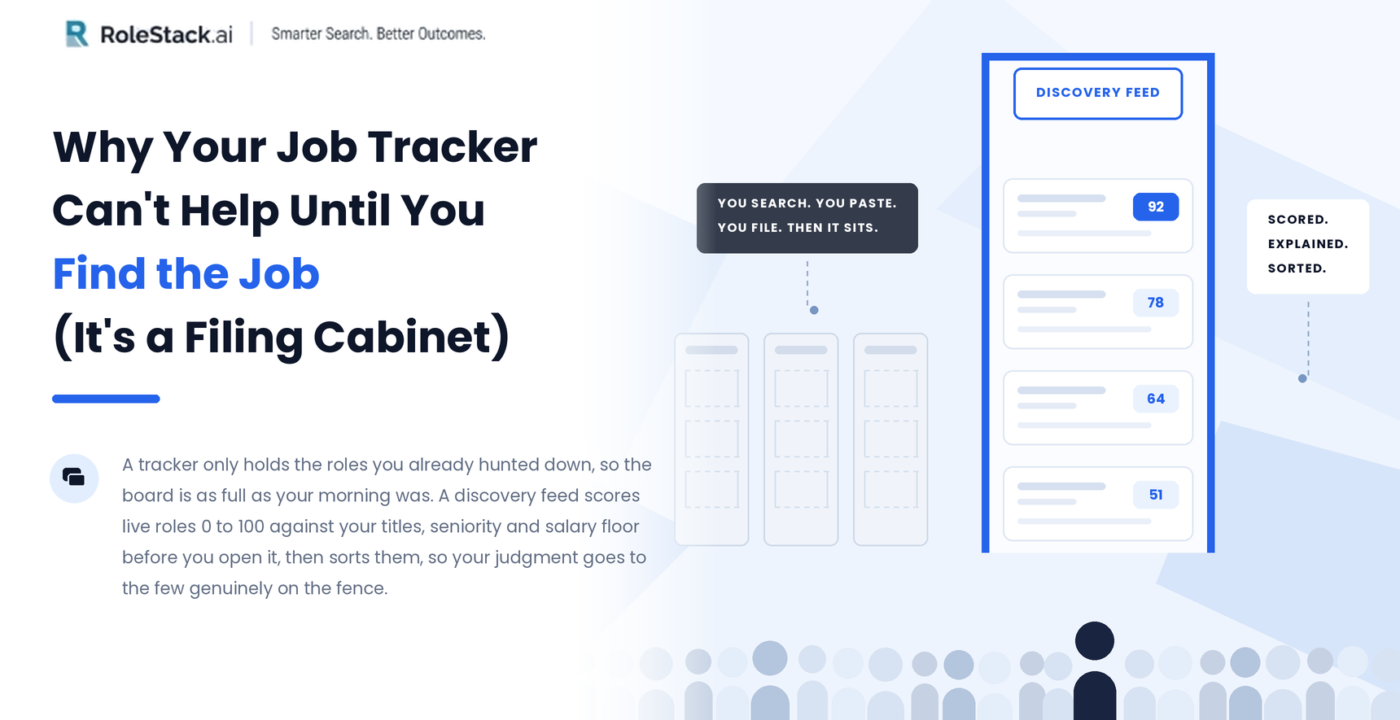
A tracker is a place to put roles you already hunted down yourself. The board is only ever as full as your morning was. Nothing appears in it unless you went out, searched, read, judged, and pasted.
Which means the tedious half of a job search is still sitting on your side of the table. Opening the same four boards. Reading the same forty listings. Doing the mental math of “am I even qualified for this” over and over until you’re too tired to do it well.
That’s the part we wanted to flip at RoleStack. The discovery feed doesn’t wait for you to save something. It’s already scoring live roles against your actual profile before you open it.
What a job match score should actually mean
Every open role in the feed gets a match score from 0 to 100.
We should be clear about what sits behind that number, because “match score” is the kind of phrase that usually means keyword overlap dressed up in a percent sign. The job description says Product Manager six times, your resume says it eight, and a tool calls that a strong fit.
Ours isn’t counting mentions. It looks at your real titles, your seniority, the salary floor you told us you won’t go below, and where you actually want to work. A role that pays under your floor doesn’t get to be an 80 just because the words line up.
That’s the whole point of scoring. The number is supposed to mean something you’d act on.
Every score shows its reasoning
Next to the score there’s a line we call “why it’s a fit.” Short, specific, written for that role. Something like “Extensive AI-native product development experience ✓.”
That one caused the most argument internally, and it earned its place. A bare number is useless to a person making a decision. If a tool says you’re a 92 and won’t say why, you don’t trust the 92, you just start second-guessing it.
With the reasoning sitting right there, you read it in two seconds and think “yeah, that tracks,” or “no, they’ve got me wrong.” Either way you’ve stopped guessing and started deciding.
Three buckets, and the one that does the work
The feed comes pre-sorted into three buckets, and day to day this is the part that saves the most time.
In flight. Roles already queued or in the middle of applying.
Moderate Match. The pile that actually needs you, a human, to make a call.
Moved on. The ones you passed on.
Most of the value hides in that middle bucket. Strong matches mostly take care of themselves, and the bad ones you were never going to touch. The moderate ones are where a person’s judgment matters, and instead of that judgment getting spread thin across a hundred listings and running out of gas around listing forty, it’s pointed at the handful that are genuinely on the fence.
That’s the real shift. Not more jobs. Fewer decisions, aimed better.
What about the job a friend forwards you?
Fair objection, and it comes up constantly. Somebody sends you a link. You spot a role on a company’s careers page that no aggregator has picked up yet. Any discovery tool that can’t handle that is only doing half the job.
So there’s “Add a role.” You paste in the title, company, location, the URL and the description, and RoleStack folds it into the exact same pipeline as everything it found on its own. Same tracking, same buckets, same treatment. It doesn’t sit in a separate “manual” list that gets forgotten by Thursday.
That matters more than it sounds like it should, because the job you found yourself is often the one you care about most, and it’s the one most likely to fall through the cracks in a tool that treats it as an afterthought.
You end up with one pipeline. Some of it surfaced for you, scored and sorted before you asked. Some of it you brought in by hand. All of it in the same place, ranked the same way.
So which one should you use?
We don’t want to oversell the gap here. The trackers named above are adding features all the time, and the line between “tracker” and “discovery engine” is blurrier than it was a year ago. If you like a clean Kanban board and you’re the kind of person who actually drags the cards, they’re well made and they’ll serve you well.
But the core difference is still real. If your tool’s job starts the moment you paste something in, you’re still the search engine. You’re still doing the tab-hopping, the copy-pasting, and the qualification math.
The way we’d put it to a friend: with a normal tracker, an empty morning means an empty board until you go fill it. With a discovery feed, you open it and there’s already a scored, sorted list waiting, with a reason attached to every single one. The only thing left is the part a machine shouldn’t be doing anyway, which is deciding what you actually want.
Open it, read the reasons, make your calls, add anything it missed.
See how the discovery feed scores your matches →
FAQ
How does a job match score work? A match score rates how well an open role fits your profile, usually on a 0 to 100 scale. Weaker versions count keyword overlap between the job description and your resume. Stronger ones weigh your real titles, your seniority level, your stated salary floor and your location preferences, so a role that pays below your minimum scores low even when the wording lines up.
What’s the difference between a job tracker and a job discovery feed? A job tracker stores and organise roles you found yourself, then follows them through stages like applied, screening and offer. A discovery feed searches and scores live roles against your profile before you go looking, then hands you a sorted list. Trackers solve the filing. Discovery feeds solve the hunting.
Can I add a job the tool didn’t find? Yes. In RoleStack, “Add a role” lets you paste in the title, company, location, URL and description of any listing, and it enters the same pipeline as roles surfaced automatically, with the same scoring and the same tracking.
Are Teal and Huntr still worth using? They’re well built and they do what they set out to do. If you prefer to find roles yourself and want a clean board to manage them, they’re a solid choice. The trade is that the board stays empty until you fill it.