User Guide
Find high-fit jobs early. Apply fast. Get interviews.
Before getting started, identify which access type applies to you. Setup steps and available features differ by type.
| Feature | Cohort User | Paid User | Free Trial |
|---|---|---|---|
| Job matching | Yes | Yes | 5/day |
| Resume tailoring | Yes | Yes | No |
| Auto applications | Free (1st month or until first interview) | Yes | No |
| Email forwarding | Required | Required | Not needed |
| Trial length | - | - | 7 days |
Cohort users are members of Mahesh's Interview Cohort - a group with early access and free automated applications for the first month (or until your first interview, whichever comes first).
Paid users have a Pilot or Auto-Pilot plan. See Plans & Limits section for details.
Free trial users receive 5 matched jobs per day for 7 days. Automated applications are not included in the trial.
These steps apply to all users. Complete them before expecting strong job matches.
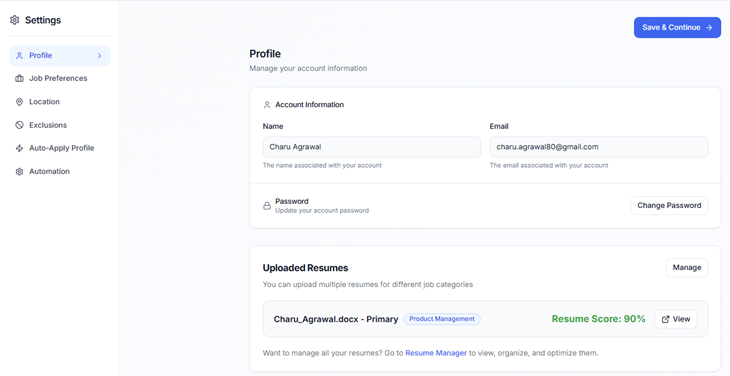
Go to Settings and upload your resume. This is used as the baseline for job matching and resume tailoring. If your resume changes later, you can re-upload at any time from Settings.
Specify your target job titles, industries, and preferred locations. Enable "Remote" if you are open to remote roles - most users should have this on. The more specific your preferences, the better your matches.
Specify visa sponsorship requirements, domains you want to target, and anything you want excluded from results. Exclusions are especially useful if there are titles or industries that keep appearing but are not relevant to you.
Go to Settings and calculate your resume score. Aim for 85% or higher. A lower score can negatively affect how many jobs you are matched to. The score reflects how well your resume is structured and how clearly your skills and experience are represented.
Note: If your resume score is below 85%, follow the in-app recommendations to improve it before reviewing matches.
Your first set of matched jobs should appear within a few minutes of completing your profile. Jobs are pulled continuously from major ATS platforms. Fewer jobs are posted on weekends, so expect lower volume on Saturdays and Sundays.
There are three modes. You can switch between them at any time from Settings.
Use RoleStack's tools to tailor your resume and generate cover letters, then submit applications manually.
Best for users who want full control over every application.
You review matched jobs and mark specific ones for the platform to apply to on your behalf. RoleStack handles submission; you decide which roles qualify.
To use this option:
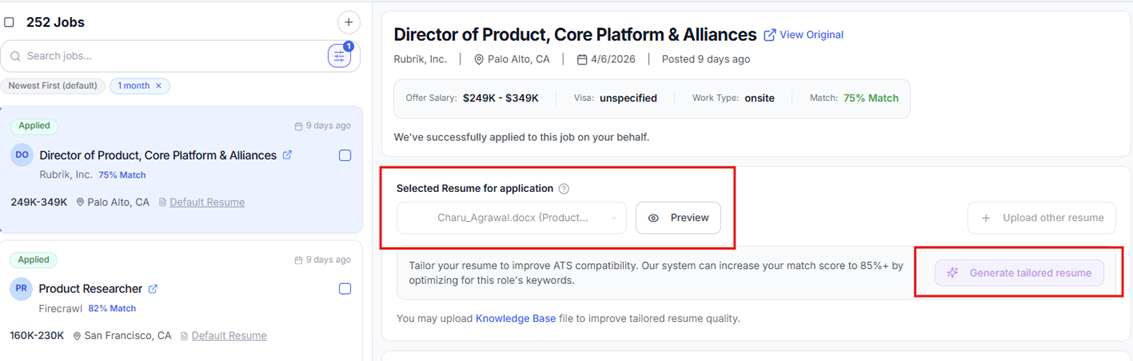
To apply with a tailored resume:
Note: Applications are time-sensitive. Applying early - before applicant volume spikes - increases the chance your profile is reviewed. If you cannot check in twice daily, Option C will get you better results.
RoleStack selects, tailors, and applies to jobs on your behalf every day. No manual review required.
To enable:
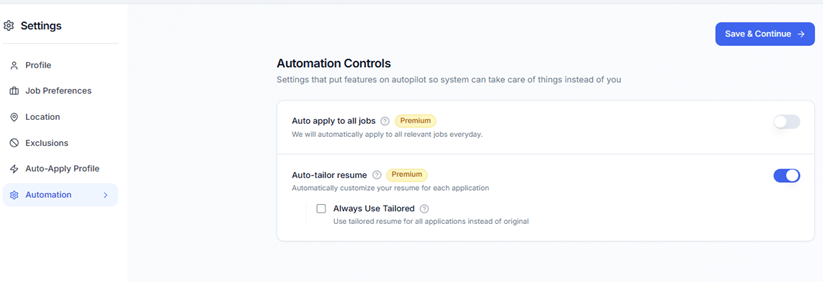
Note: Auto-Pilot users have 200 tailoring credits per month. Once used, the system continues to apply but without tailored resumes unless you contact the team for additional credits.
Recommendation: Start with Option B to build confidence in your match quality, then switch to Option C once you're satisfied with the roles being surfaced.
Required for cohort and paid users using automated applications (Options B and C). This allows RoleStack to detect recruiter responses and track application status on your behalf.
Setup steps:
RoleStack uses this forwarded inbox to detect when recruiters reply, track which applications received responses, and improve match accuracy over time. You do not need to monitor this inbox manually.
When you log in, your matched jobs appear in the left panel. Each job displays the role title, company, match score, and posting date. Click any job to see the full description, match reasoning, and application options.
Job statuses:
| Feature | Pilot | Auto-Pilot |
|---|---|---|
| AI-matched jobs | Unlimited | Unlimited |
| Resume tailorings / month | 10 | 200 credits |
| Cover letters / month | 10 | Included |
| Assisted apply (Option B) | No | Yes |
| Auto-Pilot (Option C) | No | Yes |
Cohort users receive automated applications at no cost for the first month or until they land their first interview. After that, a paid plan is required to continue automated applications.
Note: If you need more than 200 tailored applications in a month, contact the RoleStack team directly.
If your matches do not feel relevant, or you are not seeing enough jobs, check these settings before assuming the system is not working.
A low score reduces how many roles you are matched to. Recalculate your score in Settings and follow the in-app recommendations to improve it.
Make sure "Remote" is enabled if you are open to remote roles. If your location is too narrow, you may be filtering out a large portion of available roles.
If you keep seeing roles you don't want - wrong titles, wrong industries, companies you've already applied to - add them to the Exclusions section under Advanced Controls.
Very broad preferences (e.g., "any software role") can surface low-relevance matches. Very narrow preferences (e.g., one specific title) may produce very few results. Aim for 2–4 target titles and a realistic location range.
It takes 1-2 weeks after you onboard to start receiving interview calls.
Check that your resume has been uploaded and your resume score is above 85%. Also verify that your location preferences include Remote or a broad enough geography. If the problem persists, contact us.
Review your job title preferences and add irrelevant categories to your Exclusions list. Also check that your resume clearly reflects your actual experience - vague or generic resumes produce broader, less accurate matches.
Close your browser, log back in to RoleStack, and redo the email forwarding steps from Settings → Auto-Apply Profile. Pay specific attention to steps 9 and 10, which require reconfirmation. Make sure you are using a Gmail account (other providers are not currently supported).
This is typically a match quality or resume quality issue, not an application volume issue. Check your resume score, review whether the roles you are applying to are genuinely strong fits, and make sure tailored resumes are enabled. Also ensure your email forwarding is active, so recruiter replies are being captured.
Go to Settings → Automations and turn off "Auto apply to all jobs." For assisted mode, simply stop marking jobs as "Apply for me." No applications will be submitted without a "Ready to Apply" status.
Congratulations! If you are a cohort user, notify the team so your cohort access period is noted. You may want to pause autopilot while you focus on the active interview process.
RoleStack pulls directly from company ATS platforms - the hiring systems companies use to manage applications - not from aggregator job boards. This means you see roles as soon as companies post them, often before they appear on LinkedIn, indeed, or similar sites. We target greenhouse, ashby, lever, workday, workable and smartrecruiters.
No. RoleStack tracks submitted applications and will not re-submit to a role you have already applied to.
You can re-upload your resume at any time from Settings. Future tailored resumes and match scoring will use the updated version. Previously applied jobs are not affected.
The Pilot plan is designed for this. You get unlimited matched jobs, 10 resume tailorings, and 10 cover letters per month. You apply manually using RoleStack's tools.
The system applies to the best 10–15 matches per day based on your profile and preferences.
RoleStack submits your information to employers on your behalf as part of the application process. Your data is not sold or shared with third parties outside of the application workflow.
Yes, with an Auto-Pilot plan. The cohort program gives early access to this feature at no cost for a limited period, but automated applications are available to all Auto-Pilot users on an ongoing basis.
Contact the RoleStack team directly to cancel or make changes to your subscription.